Log In to Incognito Casino β€” Quick and Secure Account Entry

Your Incognito Casino account is the gateway to 3,000+ games, GBP balance management, bonus tracking and instant withdrawals. This guide covers every login method - web, mobile browser and app - plus password recovery, 2FA setup and what to do when access fails. Whether you are logging in for the first time or troubleshooting a blocked session, the steps below get you back in quickly and safely.

Welcome bonus from Β£20
Get Startedwith bonus

What Your Account Unlocks

Logging in to Incognito Casino is not just about playing games. Behind the login screen sits your full financial profile: GBP balance, deposit and withdrawal history, active bonus progress and responsible gambling limits. The platform launched in 2024 under a CuraΓ§ao Gaming Control Board licence (OGL/2024/1788/1030), and every authenticated session is protected by 128-256 bit SSL encryption.

Functions available only after login:

  • Real-money play across 3,000+ slots and 300+ live tables
  • Deposit and withdrawal via Visa, Mastercard, Skrill, Neteller, Bitcoin and more
  • Wagering progress tracker for the Triple Thrill Welcome Bonus
  • Deposit, loss and session limits under the Limits tab
  • VIP status and personalised reload offers
  • KYC document upload for first-time withdrawal verification

Without a session, you can browse the lobby but cannot place real-money bets, claim bonuses or request payouts.

Login Methods Available

Incognito Casino supports three distinct ways to authenticate.

Method What you need Best for
Email and password Registered email address plus password Desktop and web browser
Mobile number (SMS) Phone number registered at signup Quick access on smartphone
App login App installed on iOS or Android Persistent sessions on mobile

Social login (Google, Facebook) is not listed as a supported method on this platform. If you registered with an email address, use that route. If you signed up with a mobile number only, use the SMS option.

Open Incognito Casino

Finding the Login Button

On the desktop website the Login button sits in the top-right corner of every page header. It is always visible regardless of which section you are browsing - Games, Live Casino, Sports or Promotions.

On mobile browsers the header collapses into a compact navigation bar; the Login button remains in the upper-right area, often represented by a person icon or the word 'Login'. Tap it to open the authentication form.

Inside the dedicated iOS and Android apps the Login screen appears automatically if no session is stored. Returning users with saved credentials may be taken directly to the lobby.

Step-by-Step Login Process

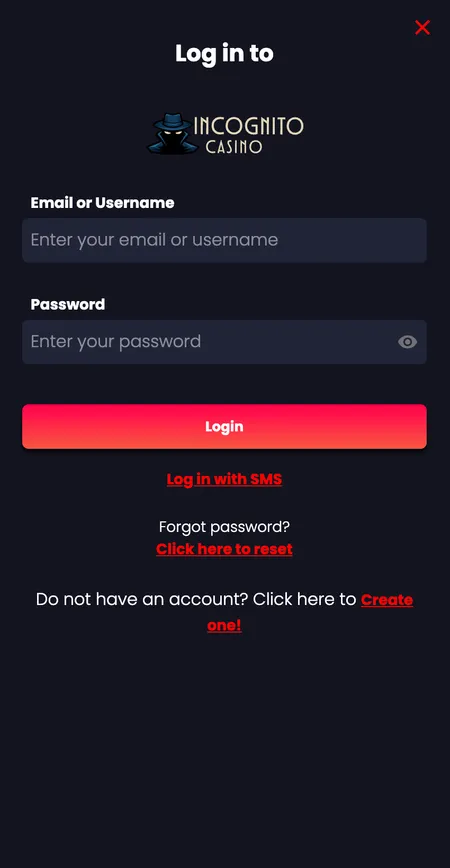
  1. Incognito Casino email and password login form

    Open the website or app and click the Login button in the top-right corner. Enter your registered email address (or username) and your password in the fields provided, then press the Login button to submit.

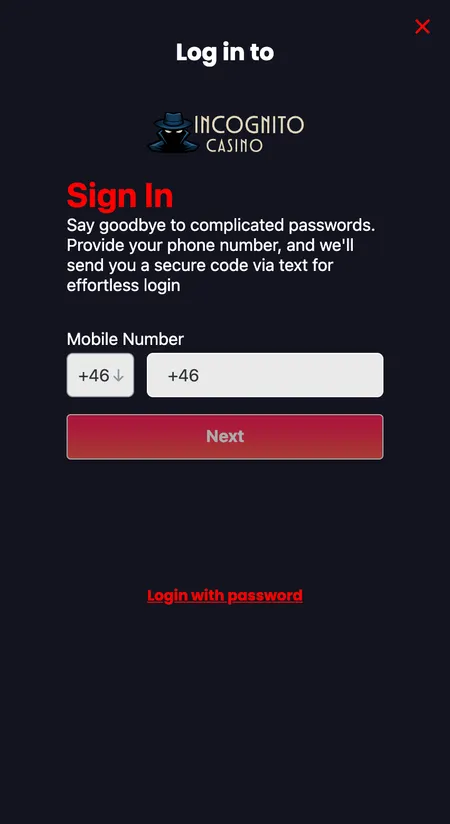
  2. Incognito Casino SMS login with phone number

    If you prefer mobile login, select the SMS option on the login screen. Choose your country code from the dropdown, enter your registered phone number and tap Next. A one-time code will arrive by SMS - enter it to complete authentication.

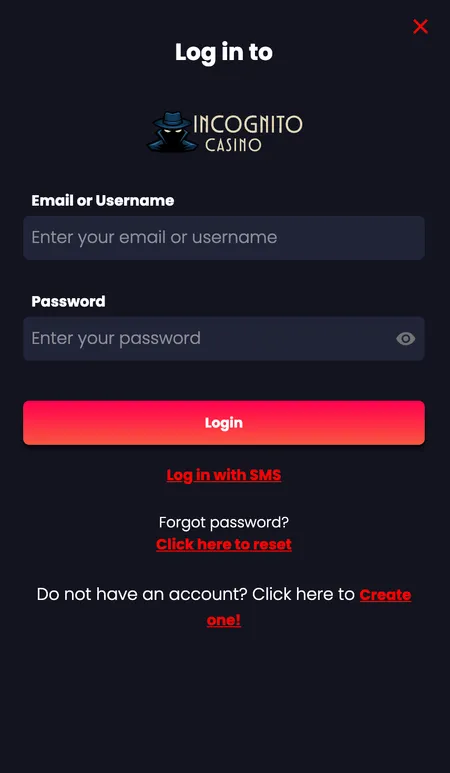
  3. Alternative Incognito Casino login form with reset link

    If you cannot remember your password, use the reset password link on the login screen. Enter your email address and follow the instructions sent to your inbox. For SMS-registered accounts, a reset code is delivered to your phone number.

Logging In via the Mobile App

The Incognito Casino app is available for both iOS and Android and mirrors the full desktop interface. After installing, open the app and you will see the login form immediately if no session is saved.

Key differences compared to the browser:

  • The app can store your session securely so you do not re-enter credentials each visit
  • Touch ID or Face ID may be available depending on your device settings
  • Push notifications for bonus updates and withdrawal status are enabled through the app
  • The full games library, cashier and account settings load at the same speed as desktop

If the app asks you to log in again after an update, this is normal - security patches reset stored sessions. Re-enter your credentials and optionally re-enable biometric login.

Play at Incognito Casino

Password Recovery and Regaining Access

If your password is not working, use the Forgot Password link on the login screen. The process differs slightly by registration method.

Email account recovery:

  1. Click Forgot Password on the login page
  2. Enter your registered email address
  3. Open the reset email and click the link within the validity window
  4. Set a new password - use at least 8 characters, mixing letters, numbers and symbols

SMS account recovery:

  1. Select the SMS login option
  2. Enter your registered phone number
  3. A reset code is sent via SMS
  4. Enter the code and set a new password

If neither method works - for example because you no longer have access to the email or phone number - contact support via live chat (available 24/7) with proof of identity to regain access.

βœ“

Incognito Casino support is available 24/7 via live chat. For account recovery with lost credentials, the team can verify your identity and restore access, typically within one working session.

Login on Different Devices

Your account works across all common devices and operating systems.

Device Method Notes
Windows or Mac desktop Web browser (Chrome, Firefox, Opera, Safari) Full interface, no download needed
iPhone or iPad Safari browser or iOS app Add to Home Screen for app-like experience
Android phone or tablet Chrome browser or Android app Add to Home Screen via browser menu
Any modern smartphone Mobile browser Adaptive layout, all features available

To add the site to your home screen without installing from a store: on Android, open the browser menu and tap 'Add to Home Screen'; on iPhone, tap Share in Safari then 'Add to Home Screen'. This creates a shortcut that opens directly to the login screen.

Common Login Problems and Fixes

Most login failures have straightforward causes. Work through this list before contacting support.

  • Incorrect password: Check Caps Lock is off. Passwords are case-sensitive.
  • Wrong email: If you have multiple addresses, try each one you may have used at signup.
  • Account not verified: Check your inbox for a verification email sent at registration. Unverified accounts may be restricted.
  • App out of date: Update the app to the latest version. Older versions may fail to connect after platform updates.
  • Poor connection: Switch from mobile data to Wi-Fi or vice versa. The login request requires a stable connection.
  • Browser cache: Clear cookies and cache if the login page is not loading correctly on desktop.
  • Geo-restriction: If you are travelling outside your registered region, the platform may apply additional checks.

If none of the above resolves the issue, open live chat and provide your registered email or phone number. The team responds in real time around the clock.

Register at Incognito Casino

Session Management and Autosave

Incognito Casino sessions persist across page refreshes on desktop. You will typically remain logged in until you explicitly sign out or the session expires after a period of inactivity.

Situations that end your session automatically:

  • Clearing browser cookies or cache
  • Using private/incognito browsing mode (the irony is noted - a fresh incognito tab requires a fresh login)
  • App update or reinstallation
  • Suspicious activity detection by the platform's anti-fraud system
  • Manually clicking Log Out

On shared or public devices always log out manually after each session and avoid saving credentials in the browser. On personal devices the app handles session continuity reliably.

Two-Factor Authentication (2FA)

2FA adds a second verification step after you enter your password, significantly reducing the risk of unauthorised access even if your password is compromised.

Enabling 2FA:

  1. Log in and go to My Account settings
  2. Find the Security or 2FA section
  3. Follow the on-screen instructions to link an authenticator app or enable SMS codes
  4. Save your backup codes in a secure location

Using 2FA at login: After entering your password correctly, the system prompts for a 6-digit code. Generate this in your authenticator app or wait for the SMS. Codes are time-sensitive - typically valid for 30 seconds.

If 2FA codes are not working:

  • Check the time on your device is synchronised (authenticator apps are time-dependent)
  • Use a backup code if you saved one during setup
  • Contact support if you have lost access to your 2FA device entirely
βœ•

If you lose access to your 2FA device and have no backup codes, account recovery requires identity verification through the support team. This process can take up to 24 hours. Always save backup codes when setting up 2FA.

Security Practices for Every Login

A few habits protect your account and your GBP balance over the long term.

  • Use a unique password not shared with any other website
  • Enable 2FA as soon as possible after registration
  • Do not log in on public Wi-Fi without a VPN
  • Check that the URL shows the official Incognito Casino domain before entering credentials
  • Review login notifications - the platform sends alerts for logins from new devices
  • Log out of shared computers and clear the session

The platform's anti-fraud system monitors login behaviour. Unusual patterns - such as logins from different countries in quick succession - may trigger additional verification or a temporary hold. This is a protective measure, not a penalty.

After Login: Key Account Features

Once authenticated, the main account panel gives you direct access to everything that matters.

Feature Location in account
GBP balance Top bar or account panel
Deposit and withdrawal Cashier button, top of page
Bonus progress Promotions or account dashboard
Deposit and loss limits Limits tab in My Account
Bet history Transaction history section
KYC document upload Verification section
Withdrawal status Account panel, pending transactions

The Limits tab is where you set daily, weekly or monthly deposit caps, loss limits and session reminders - all available immediately after login without contacting support.

Log In and Play Now

Login, KYC and Payments

Your login credentials connect directly to your payment profile. The platform requires KYC verification before processing the first withdrawal, and that verification is tied to your account login.

When you request a withdrawal for the first time, the cashier will prompt you to upload:

  • Government-issued photo ID (passport or driving licence - both sides)
  • Proof of address dated within 90 days (bank statement or utility bill)
  • Verification of your payment method

Once KYC is approved - a one-time process - future withdrawals process without re-uploading documents. Crypto withdrawals complete in 0-30 minutes post-verification; e-wallets typically within one working day; bank transfers in 3-5 working days.

For deposits and withdrawals above 2,000 EUR, an extended KYC check applies. The same login account tracks your transaction thresholds automatically.

New to Incognito Casino? Head to the Incognito Casino home page for a full platform overview, or go straight to the register page to create your account before logging in for the first time.

Login FAQ

How do I log in to Incognito Casino?

Go to the website or open the app, click Login in the top-right corner, enter your registered email and password (or use the SMS option if you signed up with a phone number), then press Login.

I forgot my password - what do I do?

Click the Forgot Password link on the login page. Enter your registered email and follow the reset link sent to your inbox. For phone-registered accounts, request an SMS reset code instead.

Can I log in with my phone number?

Yes. Select the SMS login option on the login screen, enter your registered mobile number with the correct country code, and enter the one-time code sent to your phone.

Why is my login not working?

Check Caps Lock, confirm you are using the correct email address, and ensure your account email is verified. If the problem persists, try a different browser or clear your cache. Contact 24/7 live chat if the issue continues.

Is there a mobile app for iOS and Android?

Yes. Dedicated apps are available for both iOS and Android and include the same features as the desktop site. You can also use any mobile browser without installing anything.

What is 2FA and should I enable it?

Two-factor authentication requires a second code after your password, protecting your account if your password is ever leaked. Enable it in My Account under Security settings. Use an authenticator app and save your backup codes.

My session keeps expiring - how do I stay logged in?

Sessions expire if you clear cookies or use private browsing. On personal devices, use the app for persistent sessions. On desktop, avoid clearing cookies if you want sessions to persist.

Can I be logged into two devices at the same time?

The platform may allow concurrent sessions, but logging in from a new device can trigger a security notification. For security, log out of devices you are no longer using.

What happens to my bonus if I log out?

Your bonus balance and wagering progress are saved to your account. Logging out and back in does not affect your bonus status. Progress is visible in the account dashboard after login.

Do I need to verify my identity just to log in?

No. KYC verification is only required before your first withdrawal. You can log in, deposit and play without uploading documents. Verification is triggered when you request a payout.

How do I log out from all devices at once?

Go to My Account security settings. If a global sign-out option is available, use it to terminate all active sessions simultaneously. If not, contact support to force a session reset on all devices.

Who do I contact if I cannot access my account?

Use the 24/7 live chat from the main website (no login required to open the chat widget). Alternatively, email support - responses typically arrive within 24 hours. Have your registered email or phone number ready.