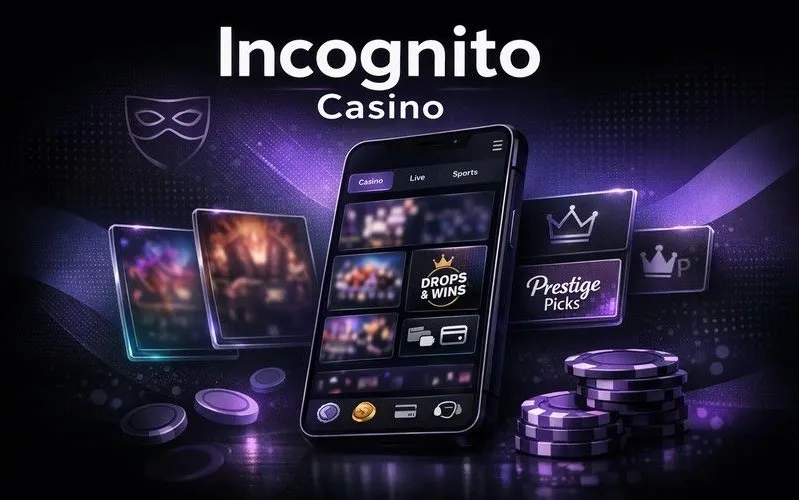
Incognito Casino Mobile App — Fast, Smooth and Always Ready

Play 3,000+ slots and live tables from your phone without losing any desktop features. The Incognito Casino app runs on iOS and Android, supports GBP accounts, crypto deposits and 256-bit SSL encryption - the same standards as the browser version. Bonuses, cashier and account limits are all one tap away.
Welcome bonus from £20
Get Startedwith bonus
Why Play on Mobile Rather Than Desktop

Speed and flexibility are the main arguments. The Incognito Casino app keeps a persistent connection to live-dealer streams, so a table session started at home continues on the commute without reconnection delays. The adaptive quality engine drops video bitrate when signal weakens, then restores HD automatically - no manual intervention needed.

The second argument is notifications. The app surfaces reload offers and Secret Missions the moment they go live in the Promotions tab, which matters when a 15-FS Wanted Dead or Alive claim window is short.

Third: touch controls fit the casino lobby better than a mouse for many players. Slot reels, bet-size sliders and the live-chat button are sized for thumbs, not cursor clicks.

The home page has a direct link to download both platform versions.

Register at Incognito Casino

Key Features of the Mobile Version

Feature Detail
Game library 3,000+ slots, 300+ live tables
Supported OS iOS (current) and Android (current)
Browsers Safari, Chrome, Opera, Mozilla
Payment methods Visa, Mastercard, Skrill, Neteller, Bitcoin, ETH
Account currency GBP
SSL encryption 256-bit
2FA login Available

Interface and Navigation

The dark-theme interface scales cleanly to small screens. Bottom navigation covers Games, Live Casino, Sports and Promotions. The search bar finds titles by name or provider - useful when the library exceeds 3,000 entries. Filters for volatility, mechanic type and provider work identically to the desktop lobby.

Security on Mobile

Every session uses 256-bit SSL. Account tokens replace stored card numbers, so payment data never sits on the device in plain text. Two-factor authentication (2FA) adds a second check at login - enable it in My Account settings before your first mobile session.

✓

The Incognito Casino app carries the same Curacao Gaming Control Board licence (OGL/2024/1788/1030) as the desktop site. RNG certificates from independent labs apply to every slot and live-dealer title, on any device.

How to Get the App

Incognito Casino offers two routes: a native app download and a progressive web app (PWA) shortcut that behaves like an installed app without occupying app-store space.

  • Native app: visit the official site, go to the app download section, select your platform (iOS or Android) and follow the prompt.
  • Android shortcut (PWA): open the site in Chrome, tap the three-dot menu and choose 'Add to Home screen'. The icon appears on your launcher instantly.
  • iPhone shortcut (PWA): open the site in Safari, tap the Share button, then 'Add to Home Screen'. The shortcut opens in full-screen mode, no browser chrome visible.
  • Desktop Chrome: an Install option appears next to the address bar star icon; click it and a shortcut lands on the desktop or Start menu.

No app-store account is required for the PWA route.

Android Installation: APK and Permissions

If you download the APK directly rather than using a store link:

  1. Go to Android Settings - Security - enable 'Install from unknown sources' for your browser.
  2. Download the APK from the official Incognito Casino domain only.
  3. Open the file; Android will request permission to install.
  4. After installation, disable 'unknown sources' again as a precaution.

Common install errors:

  • 'Parse error' usually means an incomplete download - re-download on a stable connection.
  • 'Insufficient storage' - free at least 150 MB before installing.
  • Version conflict - uninstall any older APK before the new one.
Play Now

iOS Setup and Notifications

The iOS app installs through the standard App Store flow. After installation:

  • Allow push notifications when prompted - this is how the app delivers reload-bonus alerts.
  • If you prefer the PWA route, use Safari only; Chrome on iOS does not support full Add to Home Screen functionality.
  • For Face ID or Touch ID login, enable it under My Account - Security after your first standard login.

Apple restricts certain gambling apps by region. If the app is unavailable in the UK App Store, the Safari PWA shortcut provides an identical experience with no feature loss.

Registering Through the App

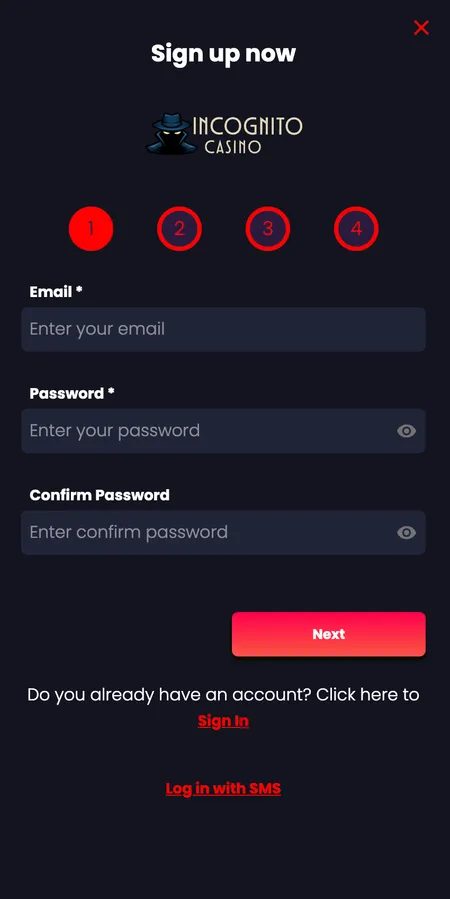
The sign-up flow in the app mirrors the desktop process exactly. Four steps are involved:

  1. Enter email and create a password.
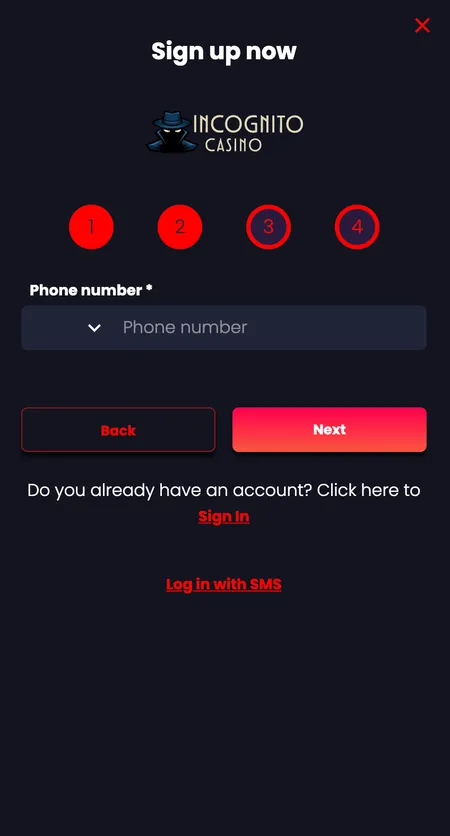
  2. Add your mobile number for verification.
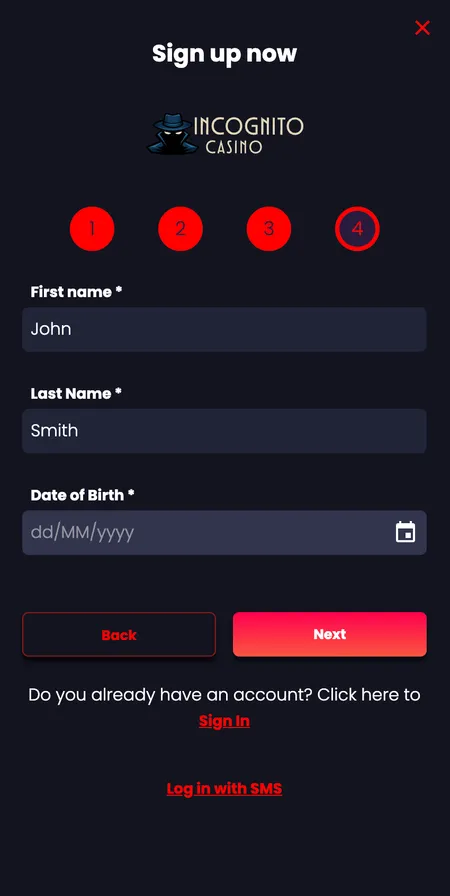
  3. Provide name, surname and date of birth.
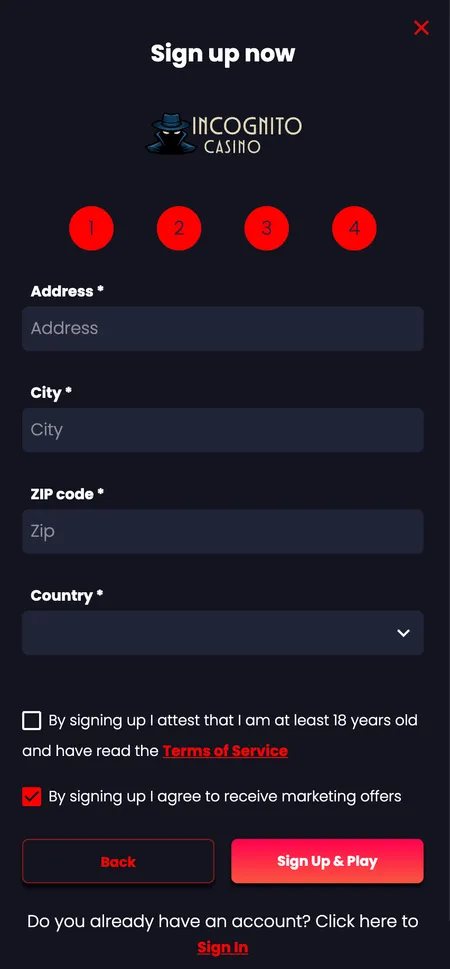
  4. Enter address, city, postcode and confirm terms.

Select GBP as your account currency during registration - this avoids conversion fees on card deposits later. A mobile number alone is enough to create the account; full KYC documents are required only when you make your first withdrawal.

Registration Steps in the App

  1. Registration step 1: email and password form

    Step 1: Enter your email address, create a strong password and confirm it. Tap Next to continue.

  2. Registration step 2: phone number entry

    Step 2: Enter your mobile number including the country code. A verification code will be sent to this number.

  3. Registration step 3: name and date of birth

    Step 3: Fill in your first name, last name and date of birth. All three fields are required.

  4. Registration step 4: address and terms

    Step 4: Add your address details, select your country and tick the consent boxes to complete registration.

Device Requirements

The app runs on any device that can handle a modern browser or a current OS version. Minimum specs:

Parameter Requirement
Android Version 8.0 or later
iOS Version 14 or later
RAM 2 GB minimum, 3 GB recommended for live tables
Storage 100-150 MB for the native app
Connection 4G or stable Wi-Fi for live casino; 3G sufficient for slots

Bonuses Available in the App

Every promotion visible on the desktop site is accessible in the app. The welcome package works across three deposits:

  • 1st deposit: 100% match up to 500 GBP
  • 2nd deposit: 150% match up to 500 GBP
  • 3rd deposit: 200% match up to 500 GBP

Wagering requirement is 35x the bonus amount. Maximum bet with an active bonus is 5 GBP per spin. Bonus buy features are disabled while a bonus is active.

Free spins offers (for example the 15 FS on Wanted Dead or Alive) are claimed directly in the Promotions tab - no desktop visit needed. The 250 FS offer triggers automatically after a deposit of 25 GBP or more.

Check the Incognito Casino bonuses page for current reload offers and VIP reload terms.

Claim Your Welcome Bonus

Login and Account Management on Mobile

Standard login uses email or username plus password. SMS login is also available for players who prefer it.

After login the My Account panel shows:

  • GBP balance and bonus balance separately
  • Wagering progress tracker in real time
  • Transaction and bet history
  • Deposit limits (daily, weekly, monthly) and session reminders
  • Withdrawal request status
  • Self-exclusion controls

2FA adds a one-time code step after the password. Enabling it takes under a minute in the Security section and significantly reduces the risk of unauthorised access.

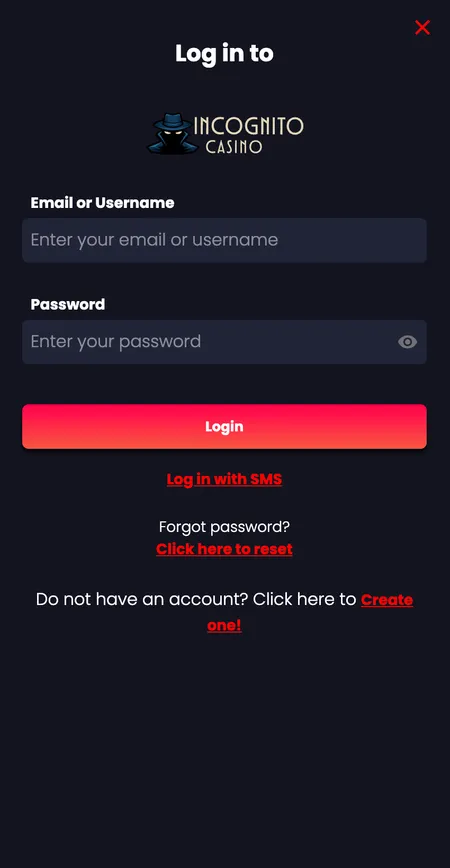
Incognito Casino login screen on mobile

The login form shows email/username, password field and the Login button. SMS login and password reset links are also available from this screen.

Sports Betting in the App

The sportsbook covers 55 sports and around 1,300 events per day. UK-relevant markets - football, rugby, cricket - are listed prominently. Odds display in standard UK decimal or fractional format.

Pre-match and in-play betting are both available. Live bet slips update in real time; cash-out where offered appears on the open bets screen. Single bets from 50 GBP qualify for the Secret Missions sports challenge.

For a full breakdown of markets and bet types, visit the betting section.

Payments Through the App

The cashier in the app supports the same methods as the desktop:

Method Min Deposit Min Withdrawal Withdrawal Time
Visa / Mastercard 20 GBP 100 GBP 2-5 working days
Skrill / Neteller 20 GBP 100 GBP approx 1 working day
Bank transfer 50 GBP 100 GBP 3-5 working days
Bitcoin / Crypto 20 GBP 100 GBP 0-30 minutes

Deposits credit instantly. Casino processing of withdrawals takes up to 48 hours; after that, bank-side timing applies. There are no withdrawal fees on any method.

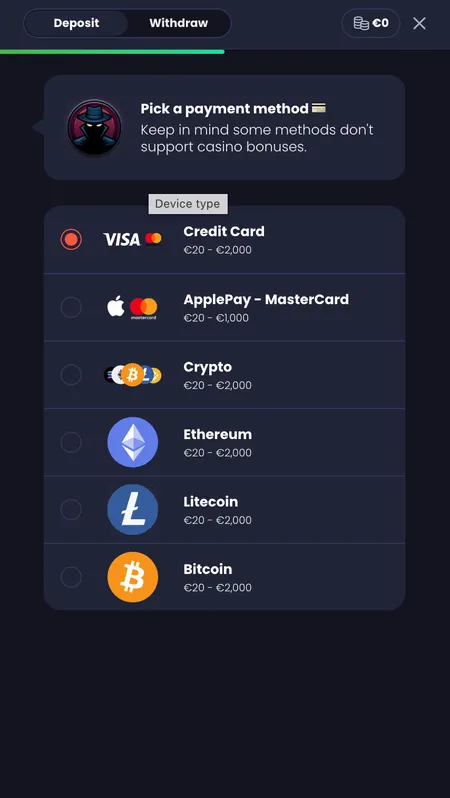
Cashier payment method selection screen

The deposit screen lists all available methods including cards, e-wallets and cryptocurrency options.

Make Your First Deposit

Keeping the App Up to Date

Android APK users: updates do not arrive automatically. Check the download section of the official site periodically. Installing over an existing APK preserves your account data; a full reinstall (delete then install) is only needed if the app stops launching.

PWA shortcut users: the site updates silently in the background. Clearing browser cache occasionally removes stale assets and keeps performance consistent.

iOS App Store users: enable automatic updates in iOS Settings - App Store - App Updates.

If an update breaks login, clear the app cache first before reporting to support.

Casino Games on Mobile

Slots load without a separate download - the game assets stream from the provider CDN. The lobby filter by volatility, provider and mechanic type works on touch screens cleanly.

Live casino titles from Evolution and Pragmatic Play Live run in HD on 4G. The chat overlay with the dealer is accessible without leaving the table view. VIP rooms including High Roller Salon and Blackjack Lounge are available to invited members.

Quick-play titles (shorter sessions under five minutes) are grouped separately - useful for a lunch-break spin. Classic Corner and Buy Features subcategories remain accessible from the mobile lobby.

Book of Dead slot cover
Book of Dead
Play'n GO
Play
Hell Hot 100 slot cover
Hell Hot 100
Classic slot
Play
Thunder Crown slot cover
Thunder Crown
Hold and Win
Play
Queen of Beasts slot cover
Queen of Beasts
High volatility
Play
Book of Abyss slot cover
Book of Abyss
Adventure slot
Play
Kongs Jungle Tower slot cover
Kong's Jungle Tower
Feature-rich
Play

App Security: Sessions and Encryption

Every data packet between the app and Incognito Casino servers travels under 256-bit SSL. Payment card numbers are tokenised - the app stores a reference token, not the card itself.

Session management: the app logs out automatically after a period of inactivity. If you lose your device, change your password immediately from any browser and contact support via live chat to freeze the account temporarily.

The Curacao Gaming Control Board licence (OGL/2024/1788/1030) requires the operator (Simba N.V.) to maintain AML procedures and segregate player funds, which applies equally to mobile transactions.

✕

Players under 18 are not permitted to register or play. Self-exclusion, deposit limits and session reminders are available in the app under My Account - Limits. These tools apply to both mobile and desktop activity simultaneously.

Incognito Casino App - Common Questions

Is there a dedicated Incognito Casino app for Android and iOS?

Yes. Native apps exist for both platforms. Android users can also install via APK from the official site; iOS users have the App Store version and a Safari PWA shortcut as alternatives.

Does the app require a new account if I already have one on desktop?

No. Your existing login credentials work in the app. Balance, bonuses and transaction history are synchronised in real time across all devices.

Can I claim the welcome bonus through the app?

Yes. Deposit from the app cashier and the bonus activates the same way as on desktop. Minimum deposit is 20 GBP; wagering is 35x the bonus amount.

Why is the APK not installing on my Android phone?

The most common causes are: 'Install from unknown sources' not enabled, incomplete download, or insufficient storage. Free at least 150 MB and re-download on a stable connection.

Are withdrawals faster through the app?

Speed is identical to desktop. Casino processing takes up to 48 hours. Crypto withdrawals complete in 0-30 minutes after KYC; card withdrawals follow bank timelines of up to 5 working days.

Does the app work without downloading anything?

Yes. Adding the site to your home screen via Safari (iOS) or Chrome (Android) creates a PWA shortcut that opens full-screen with no visible browser interface.

Is live casino available on mobile?

Yes. All 300+ live tables from Evolution and Pragmatic Play Live stream in HD. VIP rooms are accessible to invited members from the mobile lobby.

How do I enable 2FA on the app?

Go to My Account - Security after logging in. Follow the prompt to link an authenticator app or SMS code. 2FA applies to all subsequent logins on any device.

What happens to my bonus if I switch from desktop to mobile mid-session?

Nothing changes. Wagering progress is stored server-side and updates in real time regardless of which device you use.

How do I update the app?

App Store users can enable automatic updates in iOS Settings. APK users should check the official site for a new download. PWA users receive updates silently when the site publishes a new version.

Open Incognito Casino in your browser right now - no download required to start playing. Register in under two minutes and access 3,000+ games from any device.