Register at Incognito Online Casino and Start Playing Right Away

Registering at Incognito Casino takes under three minutes. You need an email address, a phone number, and a valid GBP payment method. Once your account is active, you get immediate access to 3,000+ games, the Triple Thrill welcome package worth up to 1,500 in bonus funds, and anonymous crypto deposits from day one. This guide walks through every step - from the sign-up form to your first login - so you know exactly what to expect.

Welcome bonus from Β£20
Get Startedwith bonus

Why Creating an Account Unlocks Everything

Without an account you can browse the lobby, but you cannot place real-money bets, receive bonuses, or use the cashier. Registration links your GBP balance, bonus progress, and transaction history to a single profile - protected by 256-bit SSL encryption and two-factor authentication. The platform is operated by Simba N.V. under CuraΓ§ao Gaming Control Board licence OGL/2024/1788/1030, which means your funds are held separately from operational capital from the moment you deposit.

Registration is open to players aged 18 and over. UK residents are fully supported: GBP accounts, Visa, Mastercard, Apple Pay, and major e-wallets all work at sign-up.

What You Need Before You Start

Check these three things before opening the registration form:

  • A working email address you control (confirmation link goes here).
  • A mobile number for SMS verification and optional 2FA.
  • A payment method: debit card, Skrill, Neteller, or a crypto wallet for the minimum 20 deposit needed to activate the welcome bonus.

Players under 18 cannot register. If your country is listed on the restricted-jurisdictions page, the form will block submission automatically.

Register Now

How to Register: Step by Step

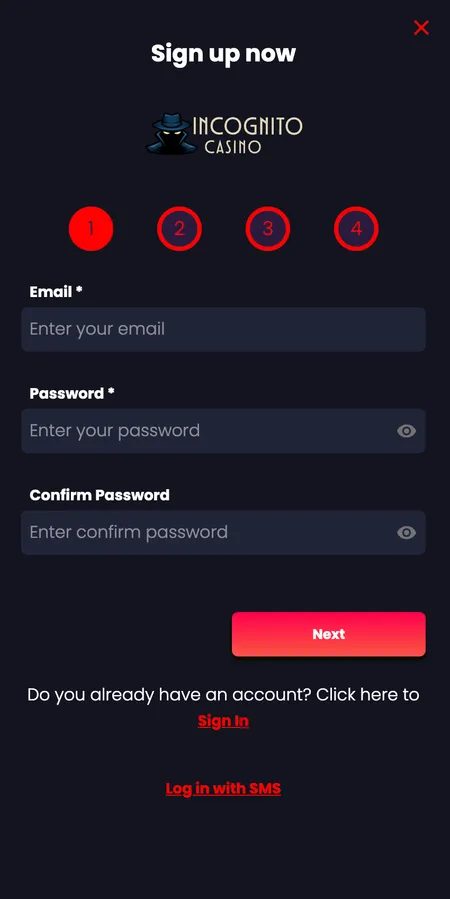
  1. Registration step 1 - email and password form

    Step 1 - Email and password. Open the registration form via the 'Register' button in the top navigation. Enter your email address, choose a password, and confirm it. The password must be at least eight characters; mix letters, numbers, and symbols for a stronger credential. Click 'Next' to continue.

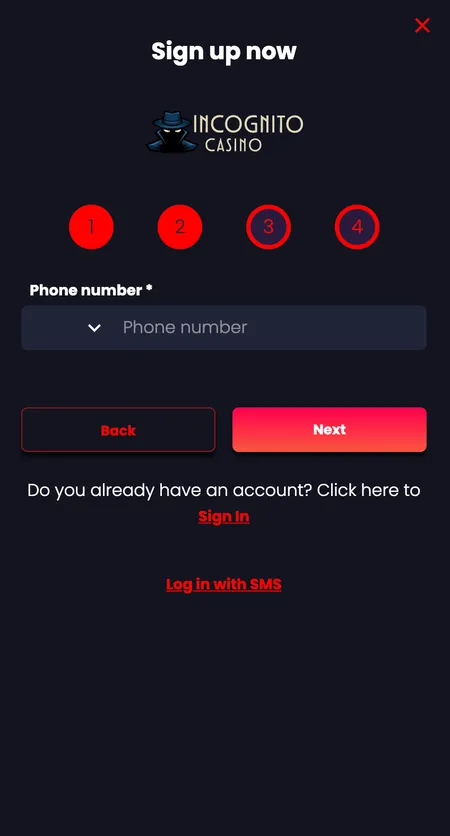
  2. Registration step 2 - phone number entry

    Step 2 - Phone number. Select your country code from the dropdown and enter your mobile number. Incognito Casino sends a one-time code to this number for verification. This is also the number you can use for future SMS logins and 2FA. Click 'Next'.

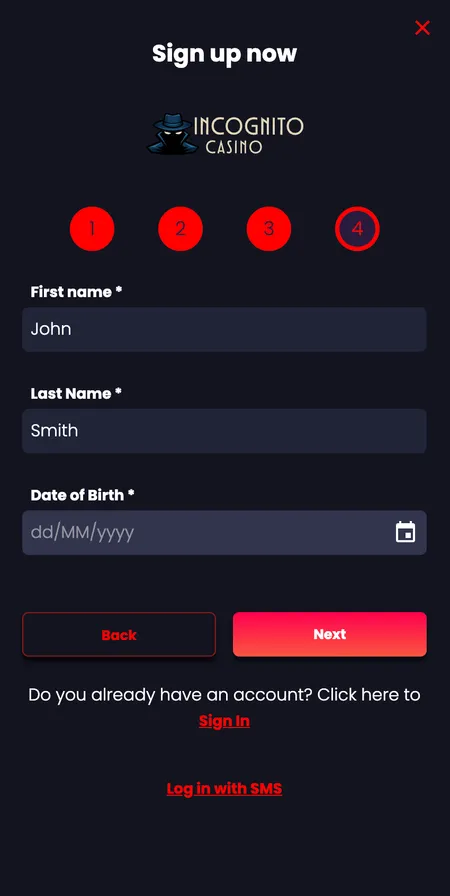
  3. Registration step 3 - personal details

    Step 3 - Personal details. Enter your first name, last name, and date of birth exactly as they appear on your government-issued ID. These details are used during KYC verification; a mismatch at withdrawal stage causes delays. Click 'Next'.

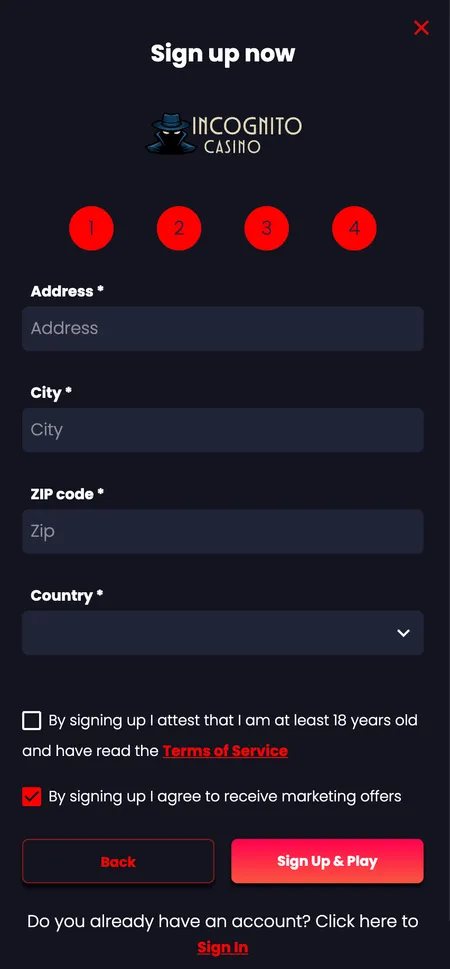
  4. Registration step 4 - address and terms

    Step 4 - Address and agreements. Enter your residential address, city, postcode, and country. Tick the checkbox confirming you are 18+, agree to the Terms and Conditions, and accept the Privacy Policy. If you have a promotional code, enter it here. Submit the form to create your account.

Account Confirmation: SMS Code and Email Link

After submitting the form you receive an SMS with a numeric code. Enter it in the verification screen within the time limit shown. A confirmation email arrives simultaneously; clicking the link in that email verifies your address and fully activates the account.

Common issues at this stage:

  • Code not arriving - check that the mobile number is entered with the correct country prefix. If the code still does not arrive after two minutes, use the 'Resend' option.
  • Email in spam folder - whitelist the sender domain so future transactional emails land in your inbox.
  • Number already registered - each mobile number is linked to one account only. If you get this error, try password recovery on the Incognito Casino login page instead of creating a duplicate account.
βœ“

Deposits are credited within minutes of account activation. Crypto deposits confirm after standard blockchain processing - typically under ten minutes for Bitcoin.

The Registration Form: Fields, Password Rules, and the Promo Code Box

The four-step form collects:

Field What to Enter
Email Active address; used for login and support
Password Min. 8 characters; unique to this site
Phone Full number with country code
Name and DOB Match your government ID exactly
Address Current residential address
Promo code Optional; leave blank if you have none

The promo code field is the last input before submission. The Triple Thrill welcome package does not require a code - it is activated in the Promotions tab after your first deposit. If you received a specific offer from an affiliate, enter the code here.

Claim Your Welcome Bonus

Registering via the Mobile App

The iOS and Android apps mirror the desktop registration flow exactly. Download the app, tap 'Register', and follow the same four steps. Touch ID or Face ID can be enabled immediately after your first login, replacing the password for future sessions.

If you prefer not to install an app, the mobile browser version at the same URL works identically. On iPhone: Safari > Share > 'Add to Home Screen'. On Android: browser menu > 'Add to Home Screen'. The shortcut behaves like a native app without taking up storage.

The Incognito Casino app supports all payment methods available on desktop, including Apple Pay and Google Pay for deposits.

First Login and Profile Setup

After verification, log in with your email (or username) and password. You land on the lobby. Before your first deposit, visit 'My Account' to:

  • Confirm your currency is set to GBP.
  • Set deposit, loss, and session limits under the 'Limits' tab.
  • Enable 2FA under security settings for an extra layer of protection.

Two-factor authentication generates a time-based code via an authenticator app. It is optional but strongly recommended - particularly if you plan to deposit and withdraw regularly.

Cross-Device Access: Browser, Desktop, Android, and iOS

Your account works on any device with a modern browser - Safari, Chrome, Firefox, Opera. All session data syncs in real time: if you start a bonus round on desktop and switch to mobile, your balance and wager progress are current within seconds.

Supported browsers include Safari, Opera, and Mozilla Firefox. There is no browser plugin required; the site loads over HTTPS with 256-bit SSL on every connection.

βœ•

Do not share your login credentials. Each account is personal and tied to one verified individual. Multiple accounts per player violate the terms and will result in suspension.

KYC Verification: What Happens After Registration

Creating an account does not immediately require documents. KYC is triggered at your first withdrawal request or when your cumulative deposits exceed certain thresholds (extended verification applies above 2,000 in deposits, additional checks above 5,000).

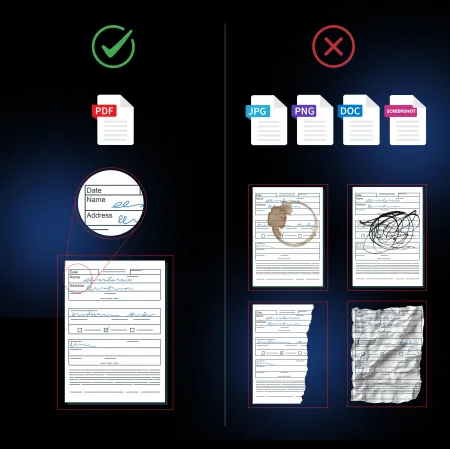
Documents accepted:

  • Government-issued photo ID - passport or national ID card, front and back.
  • Selfie with document - your face visible alongside the document.
  • Proof of address - bank statement or utility bill dated within the last 90 days, showing all four corners clearly.

The review is a one-time process. Once approved, future withdrawals process without re-submission. Crypto withdrawals complete in 0 to 30 minutes after KYC clearance; e-wallets typically within one business day.

Accepted and rejected KYC document examples

Examples of documents that pass and fail verification - all four corners visible, no cropping, no glare covering text.

Registration Errors and How to Fix Them

Problem Likely Cause Fix
SMS code not received Wrong country code or carrier delay Check prefix; use Resend after 2 min
Email already in use Existing account Use login or password reset
Form submission blocked Age or country restriction Confirm 18+ status; check eligible countries
Password rejected Does not meet complexity rules Include numbers and special characters

If the issue persists after trying the above, live chat support is available 24/7 and typically responds in under a minute.

Managing Your Profile After Registration

The 'My Account' section lets you update contact details, change your password, and review your full transaction history. The 'Limits' tab is where responsible gambling tools live:

  • Daily, weekly, and monthly deposit limits.
  • Loss limits per session or per week.
  • Session reminders at custom intervals.
  • Temporary cooling-off periods or permanent self-exclusion.

These settings take effect immediately when tightened and follow a mandatory delay when relaxed - by design, to prevent impulsive changes during a losing streak.

Set Up Your Account

Registration and the Welcome Bonus

The Triple Thrill package activates across your first three deposits:

Deposit Match Max Bonus
1st deposit 100% 500
2nd deposit 150% 500
3rd deposit 200% 500

Minimum deposit to qualify: 20 per stage. Wagering requirement: 35 times the bonus amount. Maximum bet while bonus is active: 5 per spin. Maximum cashout from bonus winnings: 2,000.

Slots contribute 100% towards the wagering requirement. Live casino games contribute 10 to 20%. Bonus buy features are disabled while a bonus is active. The full Incognito Casino bonus terms are in the Promotions section.

Securing Your Account After Sign-Up

Three actions to take within the first 24 hours:

  1. Enable 2FA in security settings.
  2. Set a deposit limit so you stay within your intended budget.
  3. Verify your email and phone number are both confirmed.

Password recommendations: at least 12 characters, no dictionary words, not reused from other sites. If you suspect unauthorised access, contact support immediately via live chat and change your password. Incognito Casino monitors accounts for unusual login patterns and may trigger additional verification automatically.

FAQ: Registration at Incognito Casino

How old do you need to be to register?

You must be 18 or older. The registration form requires you to confirm your age, and KYC verification checks your date of birth against your government ID.

Can I register with just a phone number?

Yes. A mobile number is sufficient to create an account and access crypto deposits immediately. A full email and address are required before making a fiat withdrawal.

What currencies are supported?

GBP is the primary currency for UK players. Select GBP at registration; the cashier shows balances and transaction history in pounds without conversion fees on card deposits.

I did not receive my SMS verification code - what do I do?

Wait two minutes and use the 'Resend' button. Check that the country code is correct. If the problem continues, contact 24/7 live chat support.

Can I have two accounts?

No. One account per person is the rule. Duplicate accounts are suspended and outstanding balances may be forfeited. Use the password reset if you cannot access an existing account.

When does KYC verification happen?

KYC is triggered at your first withdrawal. You need a government-issued ID, proof of address dated within 90 days, and a selfie with the document. Verification is a one-time process.

Do I need a promo code for the welcome bonus?

No promo code is required for the Triple Thrill package. After your first deposit, go to the Promotions tab and opt in to activate each stage.

What happens if I enter wrong personal details?

Your name and date of birth must match your government ID exactly. A mismatch causes KYC rejection and delays your first withdrawal. Contact support to correct details before submitting documents.

Is the registration form available in the mobile app?

Yes. The iOS and Android apps have the same four-step registration form as the desktop site. Touch ID and Face ID can be enabled after your first login.

How long does account verification take?

Initial account creation is instant. KYC document review typically completes within 24 to 48 hours of submission. Crypto withdrawals process in 0 to 30 minutes once verified.

Your account takes three minutes to set up. Open it now and access 3,000+ games, live casino tables, and the Triple Thrill welcome package.